
Quick answer
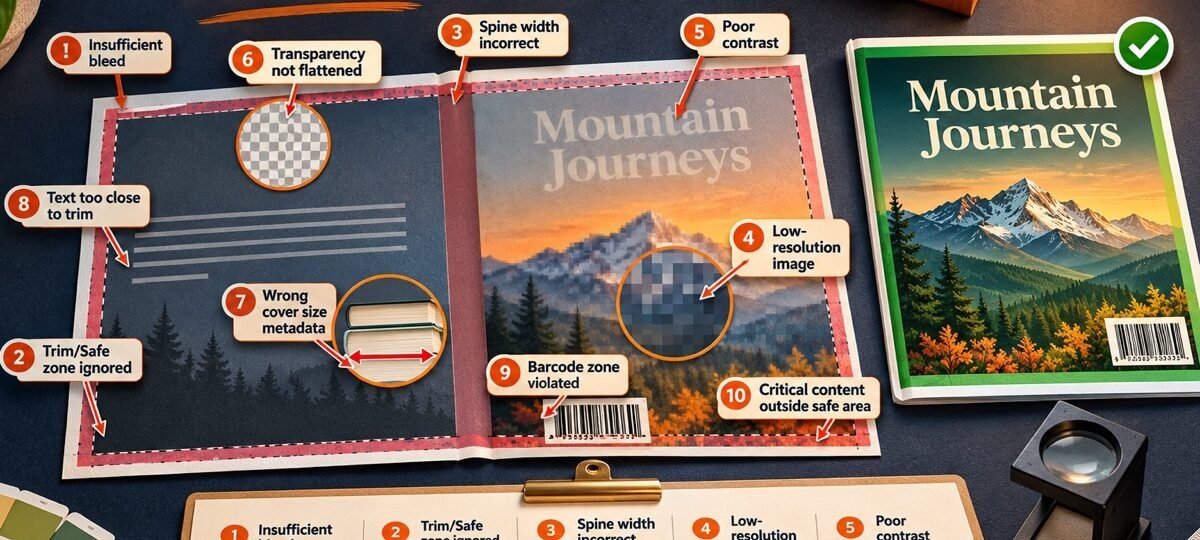
The mistakes that cost KDP uploads, in the order we meet them in real files: a wrap built before the page count was final, a skipped template, one file doing two jobs, upscaled art, text on the trim, missing bleed, spine text on thin books, live transparency, a blocked barcode zone and metadata drift.
We prepare KDP-ready cover files every week, and the same ten mistakes account for nearly every problem file that crosses our desk. So this list is ordered by how often each one actually turns up, not by what makes a tidy listicle. Already bounced? Skip straight to the rejection troubleshooter, which is keyed to Amazon’s error messages. This page is for the upload you have not made yet.
The ten mistakes at a glance
Each row points to the fix it eventually needs in the troubleshooter.
| # | Mistake | What it triggers | Troubleshooter fix |
|---|---|---|---|
| 1 | Wrap built before the interior is final | Size-mismatch rejection, drifted spine | 3 |
| 2 | Cover Calculator template skipped | Wrong total dimensions | 3 |
| 3 | One file doing two jobs | Failed upload, wrong ratio | 1, 2 |
| 4 | Upscaled or web-resolution art | Quality warning, soft print | 1, 7 |
| 5 | Text and borders hugging the trim | Safe-area flag in Previewer | 4 |
| 6 | Art stopping at the trim line | Missing-bleed rejection, white slivers | 5 |
| 7 | Spine text on a thin book | Spine-text rejection | 6 |
| 8 | Live transparency in the PDF | Transparency rejection | 8 |
| 9 | Art in the barcode zone | A white box over your blurb | 9 |
| 10 | Cover text drifting from metadata | Details-mismatch or content flag | 10, 11 |
Planning mistakes: the wrap you built too early
Mistake 1: building the wrap before the interior is final
The most common problem in author files, by a distance. KDP derives your print cover’s exact size from trim, page count and paper: 0.002252 in of spine per page on white paper, 0.0025 in on cream for black-ink books. Every edit pass moves the page count, and a wrap built on chapter-eight numbers fails the dimension check on the finished book. Lock the interior first, upload it first, then build the cover. If the interior itself is the moving part, our formatting service hands you a final page count you can build a spine on.
Mistake 2: skipping the Cover Calculator template
Freehand wraps built from a tutorial screenshot are the second habit we undo most. The template is not a convenience; it is the only place the correct spine width, bleed and fold positions for your exact spec exist together. Download a fresh one from the KDP Cover Calculator for every spec change, even a paper-colour swap. The numbers behind the template live in our book cover size guide.
File mistakes: one image doing two jobs
Mistake 3: uploading the same file for ebook and print
An ebook cover is a flat front image: JPEG or TIFF, ideally 2,560 px high by 1,600 px wide at a 1.6:1 ratio. A print cover is a wraparound PDF carrying back cover, spine and front on one canvas. Files cross over in both directions: a front-only JPEG offered as a paperback wrap, and a full wrap squeezed into the ebook slot, where the ratio check bounces it. Export two files from the same art. Every DesignDusk paperback tier ships both.
Mistake 4: upscaled and web-resolution art
KDP’s ebook minimum is 1,000 px high by 625 px wide, and small source art is usually behind a soft result. Print makes it worse, because cover images should be 300 PPI at final size and a 6 x 9 in front panel needs roughly 1,800 x 2,700 px of real detail before bleed. Upscaling satisfies the pixel count and fails the detail, and the quality warning catches it anyway. Source the full-resolution original or use different art.
Artwork mistakes: geometry on the canvas
Mistake 5: text and borders hugging the trim
Trimming is mechanical and drifts a little on every print run, which is why Previewer flags anything close to the edge. Keep every letter at least 0.25 in inside trim. The repeat offender is the decorative border: it hugs the trim by design, so it cannot be nudged, only rethought. We catch this in roughly one in five author-supplied print files.
Mistake 6: art that stops at the trim line
Print art must run 0.125 in past trim on the outside edges so the trimmed book carries ink to its edge. The tempting shortcut is scaling the whole design up until it covers the bleed, which quietly drags your title into the trim zone and swaps a bleed problem for a safe-area problem. Rebuild the canvas at bleed size and extend the background art instead.
Mistake 7: spine text on a thin book
KDP requires at least 79 pages for spine text; Cover Creator uses an 80-page minimum. A 60-page book has a spine a few millimetres wide, and normal drift would land the title on a panel. Design thin books with a blank spine in a colour pulled from the art, and let the front carry the title. Series authors: decide this at book one so later spines still match.
Export mistakes: the settings nobody checks
Mistake 8: live transparency in the PDF
Design tools love exporting transparency, and KDP requires a flattened file without it . The cover looks identical on screen either way, so the mistake stays invisible until upload. Flatten layers and transparency in the export dialog before saving; if your tool fights you, export a flattened TIFF and convert that.
Mistake 9: art or text in the barcode zone
KDP places its automatic ISBN barcode in the lower-right of the back cover unless your file supplies one. Use the exact barcode margin shown on the generated template rather than drawing a fixed box from memory. A blocked zone does not always reject, which is worse: it can print with a white barcode box stamped over your blurb. Keep the zone clear or place your own barcode there. How ISBNs and barcodes fit together is covered in our ISBN guide.
Mistake 10: cover text drifting from your metadata
The title, subtitle and author name on the art must match your book details letter for letter . Subtitles reworded in a late draft and dropped middle initials are the usual offenders. The same review catches promotional content: prices, URLs and contact details on the art are rejected under the content rules . Decide the final wording once, then make metadata and artwork agree.
When the prevention is different art
Some of these mistakes cannot be fixed in the file because they live in the art: a licensed image that only exists at web resolution, or a front-only design that was never going to wrap. Replacing beats rebuilding at that point. Every premade on our shelves ships with the ebook file, and the paperback tier adds a wrap built on your exact KDP template, sized to your final page count. Browse romance or mystery and thriller: designer-created covers run $49.99 for the ebook tier, the labelled AI-assisted shelf runs $24.99, and a custom cover runs $120 to $350 with the wrap included. Publishing wide? IngramSpark needs its own, different wrap; the seven differences live in our KDP vs IngramSpark spec guide.
FAQ
— Every DesignDusk paperback tier (from $59.99) includes a print wrap built on your exact KDP template. 1,700+ designs in stock, each sold once. Prevention starts at $24.99.
In the files we prepare, the top three are a print wrap built before the page count was final, a skipped Cover Calculator template, and one image doing both the ebook and paperback jobs. Geometry problems follow: text too close to trim, missing bleed, and spine text on books below KDP’s 79-page threshold.
Yes. The ebook cover is a flat front image, JPEG or TIFF at a recommended 2,560 px high by 1,600 px wide . The paperback needs a single wraparound PDF covering back, spine and front, sized by the Cover Calculator for your trim, page count and paper. Same artwork, two different files, always exported separately.
Yes, interior first. Your print cover’s required dimensions depend on the final page count, so the safe order is: finish the interior, upload it, note the page count KDP reports, then generate the cover template from those numbers . A wrap built before the interior settles is the most common failed file we see.
Print cover images should be 300 PPI at final size, which means roughly 1,800 x 2,700 px of genuine detail for a 6 x 9 in front panel before bleed. Ebook covers have a 1,000 px high by 625 px wide minimum, with 2,560 px high by 1,600 px wide recommended. Upscaling a small image passes the numbers and still prints soft.